🔐 File Encryptor: Protect your sensitive files with a simple and powerful solution

Why encrypt your files?
Protecting your sensitive files is no longer an option but a necessity. Whether it is confidential documents, private photos, contracts or important backups, their security must be a priority.
It is with this in mind that File Encryptor was designed: a free, accessible tool that lets anyone encrypt their files and folders in a few clicks, with no prior technical skills.
📌 What is File Encryptor for?
File Encryptor is a Windows program designed to protect your data using AES encryption, a military-grade algorithm used by governments and organisations to secure classified information.
Common use cases:
- Protecting sensitive documents: contracts, client data, financial information.
- Securing personal files: photos, videos, private diaries.
- Encrypted backup: prepare secure archives for the cloud or external storage.
- Secure sharing: send an encrypted file with a key that you pass on separately (by phone, secure messaging, etc.).
✨ The benefits of File Encryptor
✅ Easy to use
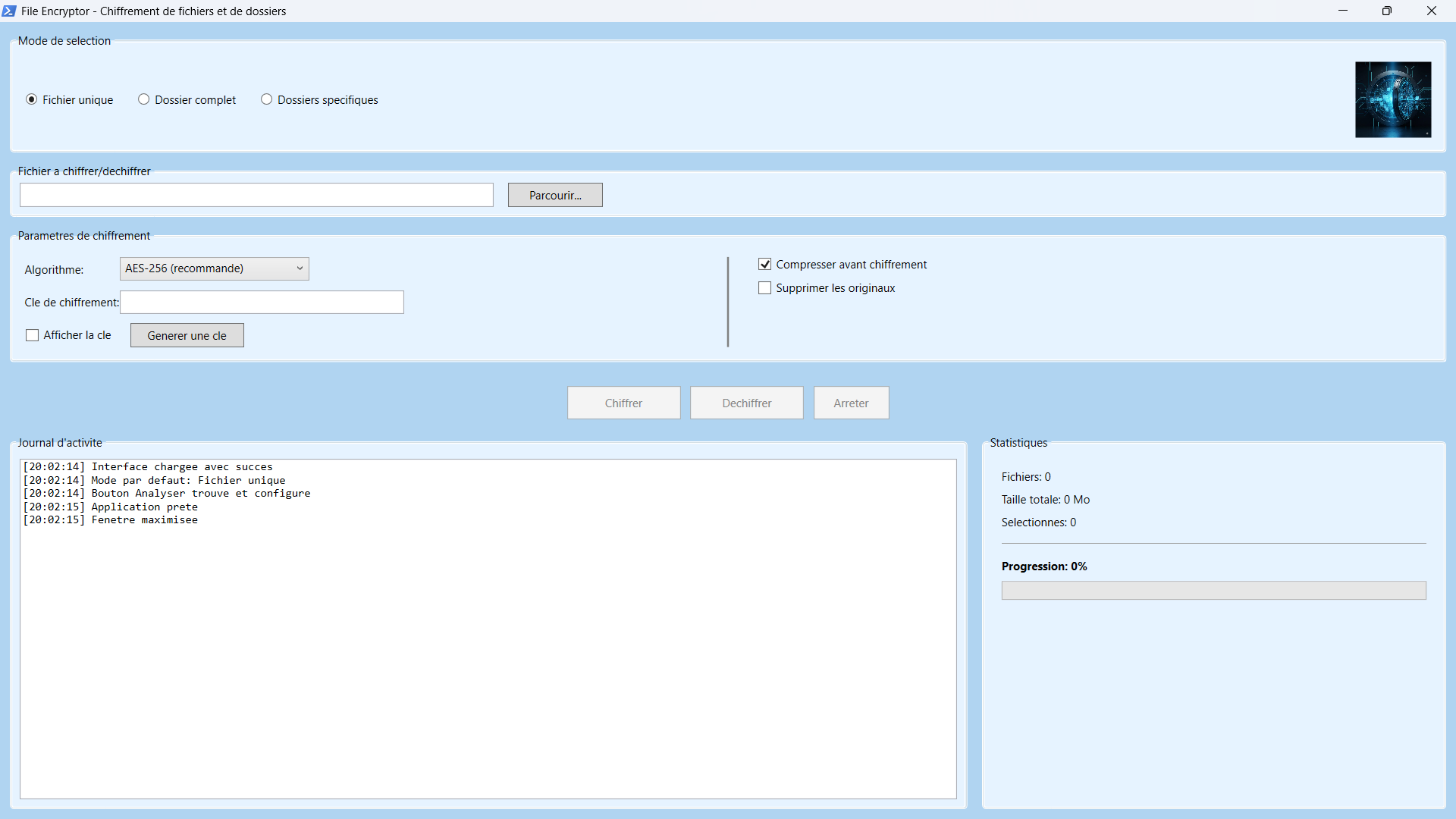
An intuitive graphical interface in French, no command lines needed.
✅ Strong encryption
Use of the AES-256 algorithm, the same one recommended for protecting "Top Secret" documents.
✅ Multiple modes
- Single file: to encrypt a single document quickly.
- Whole folder: protect an entire directory tree in one operation.
- Specific folders: select several locations (Documents, Desktop, Pictures, etc.) at once.
✅ Built-in compression
Reduce the size of your files before encryption to save space.
✅ Directory structure preserved
The structure of your folders and subfolders is kept, even empty folders.
🛡️ How does encryption work with File Encryptor?
The program uses an encryption key that you set (or have generated automatically). Without this key, it is impossible to decrypt the files. Here is the process:
- Select your files or folders.
- Choose the algorithm (AES-256 recommended).
- Enter or generate a strong key.
- Start the encryption: the files are compressed (if the option is enabled), encrypted, and saved with the .encrypted extension.
To decrypt, simply select the .encrypted files and provide the same key.
🔐 Why trust File Encryptor?
- No backdoor: the code is transparent, there is no hidden entry point.
- Unique key per user: you are the only one who holds your key.
- Open format: encrypted files keep a readable, verifiable format.
- Local and offline: everything happens on your computer, no data is sent over the Internet.
📥 How do you get started?
- Download the program files.
- Run Cliquez_Ici.bat to launch with administrator rights if necessary.
- Follow the guide in the interface.
- Always test on a non-critical file before encrypting important data.
⚠️ Points to watch
- Keep your key safe: lost key = lost data.
- Make backups: keep an unencrypted copy until you have checked everything.
- Use strong keys: at least 16 characters, with upper-case and lower-case letters, numbers and symbols.
File Encryptor is much more than a simple encryption tool: it is a complete, intuitive and reliable solution for taking back control of the security of your data. Whether you are an individual concerned about your privacy, a professional who needs to protect sensitive documents, or simply someone who wants to discover applied cryptography, this program meets your needs with elegance and efficiency.
Encryption is not reserved for experts. With the right tools, it is within everyone's reach.